


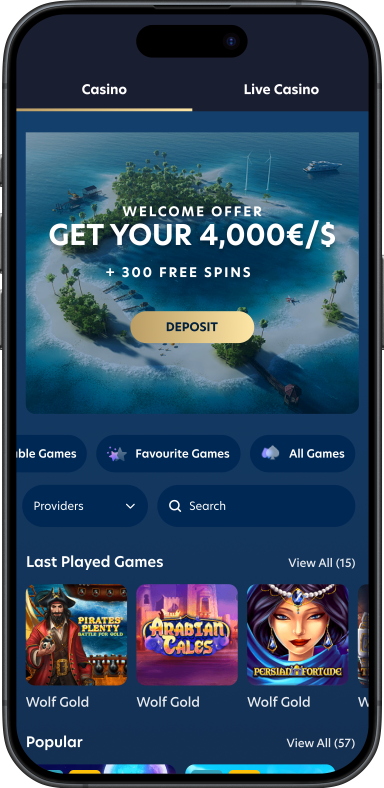

Why Isn't Lucky Dreams in the App Store or Google Play?
Lucky Dreams runs entirely in the browser and doesn't publish a store app or an Android APK. The site includes a web app manifest, which is what lets your phone treat it like an installed app: it gets its own icon, opens in a full-screen window and appears alongside your other apps. In practical terms, that means:
- Nothing to pay for. Adding the icon is free, and so is everything else about the mobile version.
- Almost no storage. The icon is a shortcut to the site rather than a program sitting on your phone.
- No update prompts. Each launch loads the live site, so you're always on the newest version.
- The same account. Your usual email and password sign you in, with your balance, bonuses and loyalty progress intact.
Which Phone Do You Have? Setup Steps
Before you start, open Lucky Dreams in your mobile browser. The steps below take under a minute, and you can sign in either before or after adding the icon; it makes no difference.
Apple devices, using Safari
- With Lucky Dreams open in Safari, find the Share symbol: a square with an arrow coming out of the top. iPhones show it at the bottom of the screen, iPads at the top.
- Tap it, then scroll the list of actions until you reach Add to Home Screen.
- Rename the shortcut if you like (it defaults to "Lucky Dreams") and tap Add.
- Go back to your home screen: the LD icon is now there and opens the casino in one tap.
Recent iOS releases let Chrome and some other browsers create the shortcut from their own share menu too. Can't see it? Bring iOS up to date, then use Safari.
Android devices, using Chrome
- With Lucky Dreams open in Chrome, tap the three dots in the upper-right corner.
- Look for Install app; some phones label it Add to Home screen instead.
- Check the name and confirm with Install or Add.
- The icon appears on your home screen or in the app drawer, ready to launch.
Using Samsung Internet, Firefox or Edge? The same feature is in their menus, normally under "Add to Home screen" or "Add page to".
Should I Trust a "Lucky Dreams APK"?
No. Android accepts apps from sources other than the Play store, so unofficial sites sometimes advertise a downloadable Lucky Dreams file. Since the casino doesn't release one, any APK using the name was built by someone else, and it could contain malware or a copy of the sign-in screen designed to capture your password. Here's how the three routes compare:
| Route | Comes from Lucky Dreams | File to install | Full-screen | Stays current | Risk |
|---|---|---|---|---|---|
| Browser tab | Yes | None | No, browser bars remain | Yes | Low; no permissions needed, one tap only if bookmarked |
| Home screen icon | Yes | None | Yes | Yes | Low; no permissions needed, opens from its own icon |
| Downloaded APK | No | Yes | Unknown | No guarantee | High; often asks for several permissions and may be malicious |
A few rules keep you clear of copycats:
- Only make the icon from the real Lucky Dreams address; skip mirror sites and download portals entirely.
- On your first sign-in from the phone, check the padlock and the address in the browser bar.
- Refuse to install an APK file, or an iPhone "configuration profile", that claims to be Lucky Dreams.
- No genuine agent will request your password, in chat or by email.
- Give your casino account a password you don't use anywhere else.
What Works on a Phone?
Everything in the desktop lobby is available on mobile. The table below shows what to expect from each part of the casino on a smaller screen.
| Section | What to expect on mobile |
|---|---|
| Pokies | The full catalogue, from Hold and Win titles like Coin Strike: Hold and Win and Gold Gold Gold to Secret Book of Amun Ra and BGaming's Lucky Lady Dreams. Spin and bet controls are placed for thumbs, and many games play upright or sideways. |
| Live dealers | Real tables streamed from Luckystreak, ICONIC21, Imaginelive, Religa and Live Vegas: roulette, blackjack, baccarat and game shows. Streams want a more reliable connection than pokies do, and betting closes on schedule even if your picture freezes. |
| Virtual tables | Digital roulette, blackjack and baccarat at your own pace, running smoothly on a small screen. |
| Promotions | Identical to desktop: the welcome package of up to $10,000 plus 500 free spins, weekly offers such as Siren Mondays, Wavebreak Tuesdays and Happy Friday, plus loyalty program perks like cashback and level rewards. Codes are typed into the cashier as part of a deposit. No offer is exclusive to phones, and one set of bonus terms covers every device. |
| Competitions | Join slot tournaments, follow leaderboards and play for the Lucky Dreams jackpots; prize pools match what desktop players see. |
| Cashier | Every AUD method, plus crypto including Bitcoin and Tether. Withdrawals are checked exactly as they would be on a computer, and ID checks are quicker with a camera in hand: snap the documents you've been asked for and send them through your account. |
| Help | A chat button on every screen, with agents online 24/7 for game, bonus or payment questions. |
Game Lagging or Icon Missing? Try This
| Symptom | First thing to try |
|---|---|
| You can't find "Add to Home Screen" | On iPhone, the option needs Safari on an up-to-date iOS. On Android, open Chrome's menu (the three dots) and look for "Install app" or "Add to Home screen". |
| The icon is gone | Type "Lucky Dreams" into your phone's search, or check the app drawer on Android. Removed by accident? Repeat the setup steps. |
| Pages and games are slow | Swap mobile data for Wi-Fi, shut background apps and refresh the page. Emptying the browser's cache in its settings may also speed things up. |
| A round froze part-way through | Resist tapping repeatedly. Open the game again and look at the round history, or have live chat confirm what happened. |
| Live video stutters | Move nearer the router or find a stronger signal. The game keeps going without you while the connection recovers. |
| You're logged out without warning | Sessions can expire for security. Sign back in and check the browser isn't wiping cookies when it closes. |
To head off most of these problems before they happen:
- Update regularly. Games are built for current iOS, Android, Safari and Chrome versions.
- Save live tables for Wi-Fi. Streaming video uses far more data than pokies do.
- Free up the phone. Quit anything pulling data in the background, such as video or large downloads, particularly on older models.
- Release the rotation lock if you'd rather play wide; plenty of games and live tables suit landscape.
- Sign in with your face or fingerprint. Store your Lucky Dreams password in the phone's password manager so you don't have to type it.
How Do I Stop the App Taking Over?
An icon on your home screen makes the casino very easy to open, sometimes too easy. The phone's own tools (Screen Time on iPhone, Digital Wellbeing on Android) let you set a daily allowance for particular apps and sites, while dedicated gambling blockers keep casino sites from loading on any of your devices.

Inside the casino, Lucky Dreams live chat can add a spending limit, a cooling-off break or self-exclusion. When gambling is hurting you or someone you care about, Gambling Help Online offers confidential support free of charge, 24/7, on 1800 858 858. Find more on our safer gambling page.